

Introduction
AgentSight is a conversation tracking, analytics, and database platform for conversational AI. It gives your clients an elegant window into their AI — dashboards, transcripts, and analytics — on top of a managed conversation backend you can query via API.
Unlike traditional observability platforms built for developers, AgentSight focuses on both client visibility and developer utility. It provides a persistent, queryable database backend for your conversation data, not just logs or traces.
The Python SDK works on one principle: maximum information for minimum code. What can be captured without your help — LLM calls, token usage, cost, timings — is captured automatically. What only your code can know — which conversation this is, what the user said, what the agent replied — is one explicit call each, and each has a reason.
What It's Used For
AgentSight's core purpose is two-fold:
- To help you share real-time conversation data, transcripts, and analytics directly with your clients in an easy-to-use dashboard.
- To provide a fully managed database backend for your conversational AI, saving you from building and maintaining your own database for transcripts, messages, and long-term memory.
As a client-facing platform, your clients gain direct access to:
- Conversation transcripts - see exactly how users interact
- Usage analytics - engagement trends, token usage and cost, response times
- Custom reports - build reports based on filters, metrics, timeframes
- Data export - download or integrate the raw data for internal use
See all available metrics to track
Provide Value
Offering a client-facing platform transforms your offering from just building AI solutions to delivering a full, data-driven solution with a persistent backend and a UI your clients can actively use — without you building them a portal.
As a database and API solution, developers can:
- Store all conversation data (transcripts, messages, attachments, tool activity) without setting up or managing their own database.
- Read everything back through one client — conversations and transcripts, feedback, tool and task activity, token usage and spend, and the raw spans behind it all.
- Use AgentSight as a long-term memory store for their AI agents.
- Integrate as an add-on to an existing system (like a separate database or observability platform) or use it as the primary, all-in-one database for a new conversational system.
Use it as an add-on — nothing has to be replaced
AgentSight plugs in alongside whatever you already run — your own database, your observability platform — and immediately adds a layer your stack doesn't have today:
- Additional data captured from every chat — transcripts, tool activity, token spend — without building any of it yourself
- Analytics and reports for the conversations you already handle
- A shared surface for you and your clients to talk about the quality of their chats, backed by the actual transcripts
- Tickets as action items — turn a conversation that needs follow-up into a tracked task
Or go all in and use it as the primary, all-in-one database for a new conversational system. The integration is the same few lines either way.
Dashboard
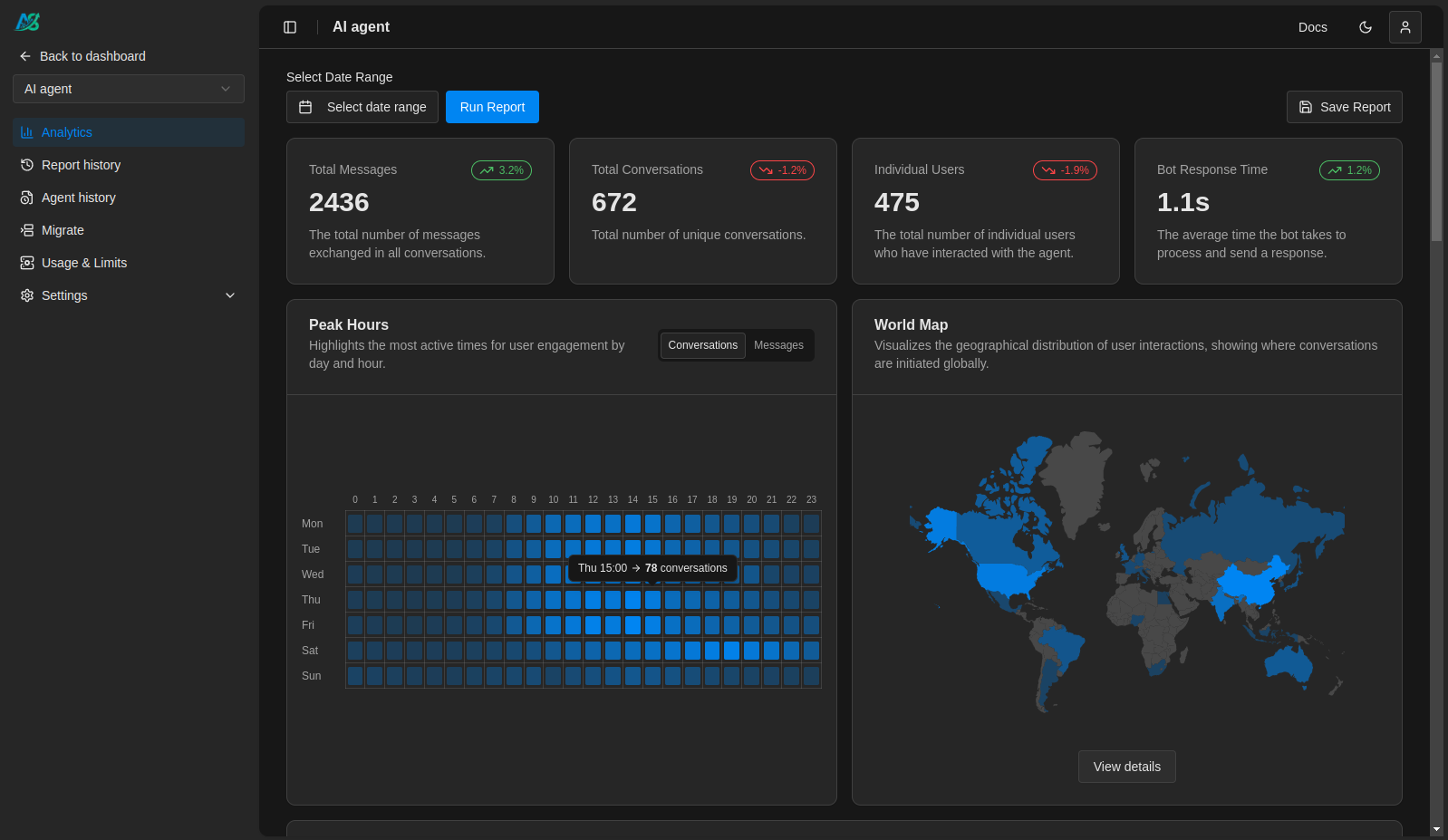
The AgentSight Dashboard is where the data lands: the web interface where your clients explore their conversational data and insights.
It offers:
- Full access to all conversation transcripts
- Analytics for token usage and cost, message volumes, response times
- Custom report generation and export capabilities
- White-labeled, client-specific dashboard views under your branding
Clients can filter by date, explore trends, and visualize performance.
How Can My Clients View the Dashboard?
There are two ways your clients can access the dashboard:
- Via Direct Invitation: you can invite your clients to view the dashboard hosted on your specific subdomain under our main domain.
Example: yourcompany.agentsight.io
- Via Embedded Dashboard: you can embed the dashboard directly into your own or your clients' platforms, such as WordPress sites or custom-built applications.
Feedback and Tickets
The dashboard is not just a window — it closes the loop between your end users and the people running the AI:
Feedback is end-user sentiment —
positive,neutralornegative, with an optional comment — attached to a single conversation or to the agent as a whole. You can record it from your own UI through the API client, read it back the same way, and filter conversations by it; on the dashboard it sits alongside the conversation it belongs to.Tickets are the follow-up workflow built on top of feedback. A conversation or a piece of feedback that needs action can be turned into a ticket and worked on the dashboard — triaged, tracked, resolved — so acting on what your clients see happens on the same surface they already use. Tickets are worked on the dashboard, but the API reads them back: conversations and feedback carry their tickets behind
include_tickets=True(and unconditionally on detail), so an integration can see what was filed and whether anyone acted on it.
Who It's For
AgentSight is built for:
- Developers, agencies, and teams delivering conversational AI solutions who need a client-facing dashboard and/or a managed conversation database.
- Freelancers managing multiple AI clients.
- Organizations wanting to offer clients transparent, usable insights into their AI systems.
- Anyone who wants to deliver more value on top of an AI system that already works — capturing richer information from every chat, offering analytics out of the box, and tightening the communication between developers and clients with tickets built from real conversations.
It makes internal performance data useful to you (via API) and accessible to your clients (via the dashboard).
What You Can Track
- Conversations, turns, and messages — the transcript your client reads, and the answer latency behind every exchange.
- Tools and tasks — units of work with measured durations, shown as actions on the dashboard.
- LLM calls, tokens, and cost — counted automatically for every call inside a conversation, priced server-side.
- Button interactions — clicks from your UI, recorded as events in the conversation.
- File attachments — recorded, or uploaded and stored.
- Custom metadata — business context attached to conversations and messages.
Each of these is captured in a deliberate shape. What gets traced & why walks through every one — and explains why it is captured the way it is.
Comparison with Observability Platforms
| Feature | AgentSight | Langfuse | Phoenix Arize |
|---|---|---|---|
| Primary Focus | Conversation analytics & client dashboards | AI Observability | LLM tracing, evaluation |
| Designed For | Clients & End Users | Developers | Developers |
| Client Dashboard Access | ✅ | ❌ | ❌ |
| Actionable performance reports | ✅ | ❌ | ❌ |
| Conversation analytics dashboard | ✅ | ❌ | ❌ |
| Shareable Transcripts | ✅ | ❌ | ❌ |
| White-Label Support | ✅ | ❌ | ❌ |
| Usage Metrics Tracking | ✅ | ❌ | ❌ |
| Usage Analytics & Reports | ✅ | ❌ | ❌ |
| Automatic Token & Cost Tracking | ✅ | ✅ | ✅ |
| Raw Trace Data via API | ✅ | ✅ | ✅ |
| Trace Debugging UI¹ | ❌ | ✅ | ✅ |
| Data Export | ✅ | ✅ | ✅ |
¹ AgentSight records complete OpenTelemetry spans and makes them readable through its API, but its dashboards are built for client visibility, not internal debugging.
AgentSight complements observability platforms. It's not built for debugging, but for giving clients insight into their own AI systems and providing developers a simple database and API for conversation persistence.
Quick start
Instrumenting a handler is a conversation, a turn, and the two messages:
import agentsight

agentsight.init()

with agentsight.conversation("wa-3859"):
    with agentsight.turn():
        agentsight.user_message("Where is my order?")
        response = agent.run(...)
        agentsight.agent_message(str(response))
Everything inside — tool calls, LLM calls, token counts, cost, latency — is captured without being mentioned. Once tracked, the data is live in the client dashboard and readable through the API, allowing you to use AgentSight as your primary conversation database.
Continue with the Quickstart, and see What the SDK sends for the complete disclosure of what goes over the wire.